Building a Homelab
A while ago, a friend introduced me to the concept of homelabs. And I’m not talking about cooking meth but building servers and self-hosting at home. There are whole subreddits dedicated to it, like r/homelab and r/selfhosted, where people share their NAS builds, smart homes and personal AI experiments, just to name a few.
For a web developer, this is a great way to get exposure to topics like Linux, networking, hardware and Docker, so after Jayphen showed me his setup for downloading Linux ISOs one day, I decided to build my own.
Choosing the right hardware
I spent a while on hardware research and decided on a Mini-ITX motherboard off AliExpress with a low-end Intel Celeron CPU, two NVMe slots and a bunch of SATA ports–not very powerful but I thought that for a NAS, it’s enough. I also got a sleek aluminmium case because I couldn’t bring myself to buy an ugly plastic box.
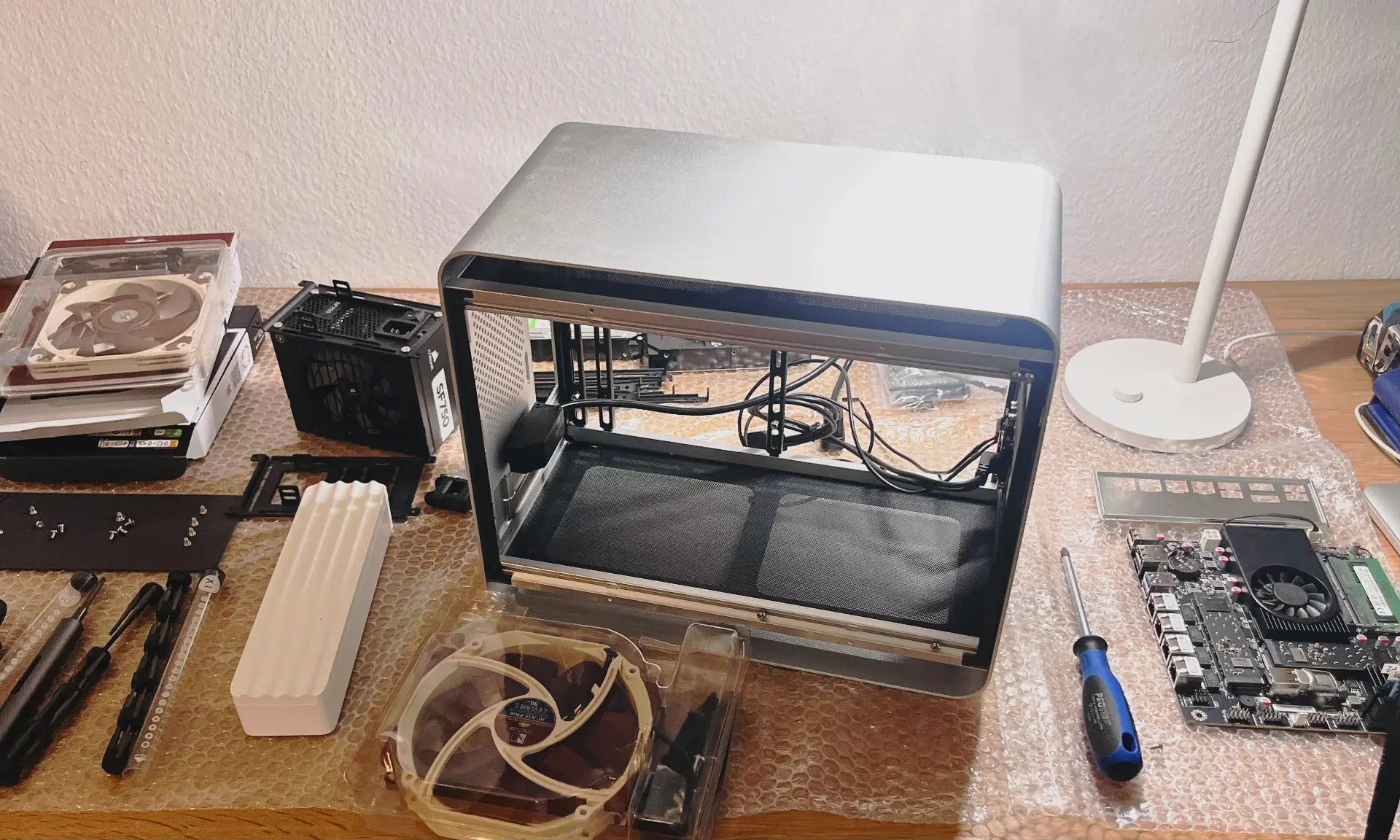
NOTE
The hardware has held up well, but the one thing I’ve regretted as I kept adding services was not getting slightly more powerful specs, maybe an Intel Core i3 and 16GB of RAM.
NixOS
I started on Unraid OS. Unraid makes it easy to set up a storage array with parity to protect against drive failures and to create network shares. They also have a large community catalog of Docker templates for installing all sorts of apps.
This setup worked great for me initially but my Docker image got corrupted a few times and after setting up the services all-over for the third time, I got annoyed by the click ops and was looking for something more reliable.
That’s when I discovered Nix, which is a tool for managing system configuration declaratively. I’d watched Surma’s intro a while back and loved the idea of a single source of truth for all config, but it clicked for me when listening to Wolfgang explain how he runs his entire homelab on NixOS. NixOS builds on Nix to define a whole system (packages, services, networking, firewall rules) as a single config, which was exactly what I needed.
I now run NixOS on picard (my machines follow a TNG naming scheme) and I’m very happy with it so far:
- Changes are safe. If I break something, I can roll back to the previous generation with one command.
- The server isn’t precious anymore. If the hardware dies, I can replace it and run
nixos-rebuild switchagainst my flake and I’m running again. - Every change is diffable and tied to a commit, so I can see exactly what I did to my system and why.
Recently, I also started doing the same thing on my Mac with nix-darwin but that’s a post for another time.
TIP
Nix works great with coding agents. All configuration is declarative and in one place, which makes it easy to one-shot changes to the system. And if the agent made a mistake, it’s easy to roll back because every previous state is stored as a generation.
Networking
I bought a cheap domain, so every service gets its own subdomain likehomeassistant.leolab.party. They all terminate at a Caddy reverse proxy that holds a wildcard cert issued via Cloudflare.
For remote access I use Tailscale, a mesh VPN built on WireGuard. To make service URLs work the same from both the LAN and the tailnet, I run CoreDNS on the homelab server with two listeners for *.leolab.party:
- On the LAN, hostnames resolve to the server’s LAN IP.
- Over Tailscale, they resolve to the server’s tailnet IP.
This way, the service URLs stay the same in my local network and when I’m on the go but I don’t need to connect to Tailscale when I’m at home.
Applications
I like owning my data, building tools that works exactly the way I want them to, and not depending on some company staying in business. The services I’m hosting all fall into those categories. A few examples:
Home Assistant
The de facto standard running the homelab enthusiast’s smart home. I’m also running Zigbee2MQTT with a USB Zigbee radio, which allowed me to toss the proprietary Philips and IKEA gateways for connecting their smart lights.
Paperless
I still get a lot of paper mail in Germany. Anything I don’t need to keep physically I capture using Quick Scan, which uploads it to my Paperless instance where it gets OCR’d, tagged, and then the paper goes in the bin.
OpenClaw
Personal AI assistent with persistent workspaces on the server. Still experimenting with it but I will probably need beefier hardware to run OpenClaw since it holds conversations in memory, which is a bit too much for my low-end system.
Keeping it running
These are a few “boring but important” areas that I’ve tried to get right:
- Backups: The storage array is protected from single-drive failure, but everything important is also backed up to Backblaze B2. If the house burns down, I can just rebuild from the flake, restore from B2, and start services.
- Security: All services bind to localhost and are only reachable through the reverse proxy. The firewall keeps ports closed by default, with only DNS and HTTPS open on the LAN. For the few things that need a public endpoint, I use Cloudflare Tunnels rather than opening ports directly.
- Secrets: I already use 1Password personally, so it made sense to also store my homelab secrets there. When the system boots up, secrets are pulled through opnix and provided to the right services.
What’s next
I’ve been having a lot of fun building small tools for myself, now that it’s much faster to do so with LLMs, like a Telegram bot sending me weekly newspaper articles in Spanish, a signals-based Home Assistant plugin for complex automations using TypeScript instead of YAML – and many more ideas.

My NixOS config is up on GitHub if you want to poke around or you can hit me up on my socials if you have any questions.